|
|
Using the Algebra/Formula Question Type |
Algebra / Formula Question Type
This question type is designed for responses that require complex math expressions, equations, or STEM formulas. You enter the correct answer using the built-in LaTeX Equation Editor, and students see the same editor when completing the question.
In the Flex Editor, this item is called Algebra Expression. In the Slide Editor, it’s Algebra / Formula. Aside from the name, it works the same way in both.
Add the Question
In the Flex Editor, click + Add and choose Algebra Expression.
In the Slide Editor, open the Tool Box on the right, under Math, click Algebra / Formula.
 |  |
In the Slide Editor, your cursor changes to crosshairs; click once to place the item, or click and drag to set its size and position.
Enter the Correct Answer
Once the item is added, the equation editor window opens:

Select Add an Expression to open the Equation Editor and enter the correct answer. When finished, click Save Changes.
Automatically Accept Equivalent Forms
You don’t have to type out every acceptable version of an answer by hand. After entering a correct expression, click Create equivalent forms.
Classwork will generate every mathematically equivalent form of that expression and add each one to your list of accepted answers. A student’s response will be marked correct if it matches any form in the list.
For example, entering −2x(−9 + 9x) and clicking Create equivalent forms fills the list with its equivalent expressions automatically.
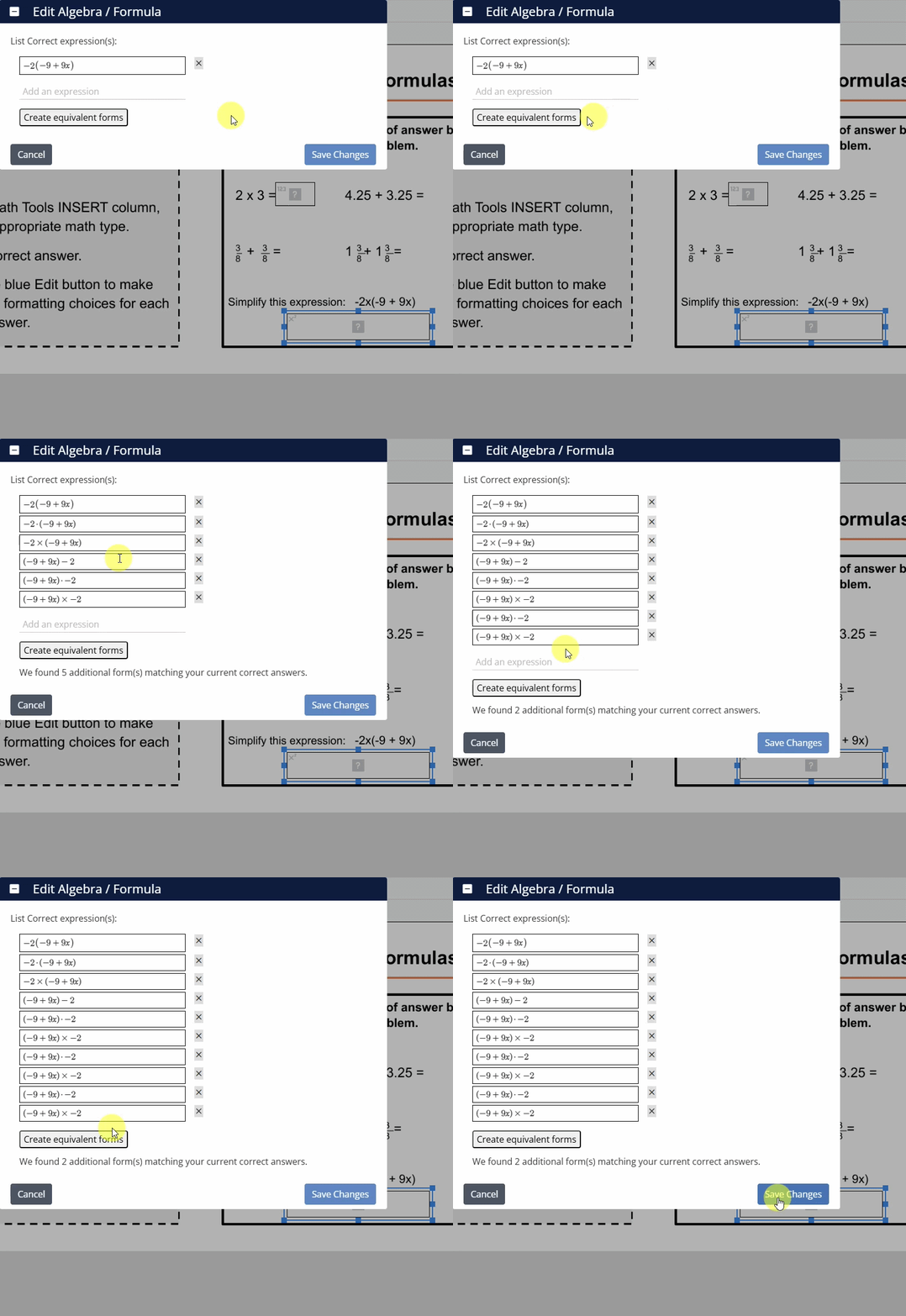
To remove a form you don’t want to accept, click the × next to it. When finished, click Save Changes.
What Students See
Students use the same Equation Editor to enter their response when completing the question.
Was this article helpful?
That’s Great!
Thank you for your feedback
Sorry! We couldn't be helpful
Thank you for your feedback
Feedback sent
We appreciate your effort and will try to fix the article