|
|
How To Fix "You Cannot Begin This Assignment Outside the LTI Environment" Error |
Chrome displays this icon on the far right of the URL bar when third party cookies are blocked:

TeacherMade Does Not Support Incognito Mode in Canvas and Schoology
How To Allow Third Party Cookies
You may wish to ask your IT department to allow third party cookies for app.classwork.com. They'll know how to do that in a way that will be distributed to all your devices. If you'd like do it yourself, click here to read the instructions.
Canvas - Opening Assignment in a New Tab
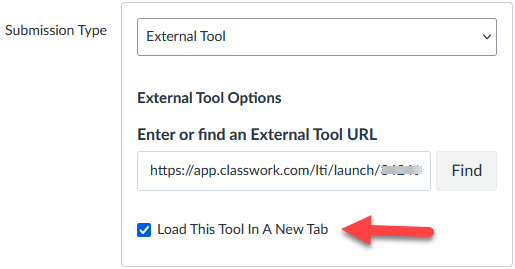
You can also fix this issue by telling Canvas to open the assignment in a new tab. Just edit the assignment options in Canvas and check this box.
Schoology - Opening Assignment in a New Tab
You can fix this problem by telling Schoology to open the assignment in a new tab. Edit the assignment in Schoology and change the "Launch Options" choice to be "Open in new browser tab."

Was this article helpful?
That’s Great!
Thank you for your feedback
Sorry! We couldn't be helpful
Thank you for your feedback
Feedback sent
We appreciate your effort and will try to fix the article