|
|
How To Allow Third Party Cookies |
Third party cookies are a special kind of web cookie that often has stronger security restrictions than regular web cookies. In some cases, such as embedding activities in Canvas or Schoology on Apple devices, you may need to explicitly allow Third Party Cookies. The instructions below will help guide you how best to do so.
Before You Allow Third Party Cookies
Allowing Third Party Cookies in Chrome

- Click the 3-dot menu in the far upper right of your browser.
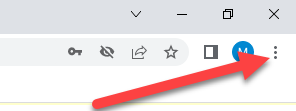
- Then select Settings.
- In the Search Settings box, type cookies.
- Click Cookies and Other Site Data.
- Make sure Block third-party cookies in Incognito is selected. This is Chrome’s default setting. It blocks third-party cookies only in Incognito, but allows them in regular browsing. Note: if a student launches Classwork.com in Incognito, it may not work correctly.
- Click the Add button next to Sites that can always use cookies under Customized Behaviors.
- When prompted, enter app.classwork.com
- Check the box reading Including third-party cookies on this site.
Allowing Third Party Cookies in Safari
- Go into the Safari menu.
- Choose Preferences…
- Choose Privacy.
- Uncheck the box reading Prevent cross-site tracking. It will save that automatically.
Allowing Third Party Cookies in Microsoft Edge
To permit third party cookies in Edge:
- Click the 3-dot menu in the upper right of the browser to change settings.

- Choose Settings.
- Click Cookies and site permissions.
- Click Manage and delete cookies and site data.
- Uncheck Block third-party cookies (this will allow third party cookies from all sites)
-- or to allow ONLY for Classwork.com --
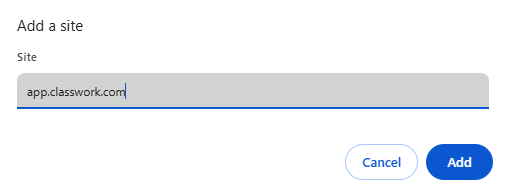
- Click the Add button in the Allow box.
- Enter app.classwork.com into the URL field.
- Click Include third-party cookies on this site.
- Close the settings tab. The change should take effect immediately.
Changing the Settings on Multiple Devices
The instructions above can help you to fix the problem for the device you changed settings for. Your IT department may have device control software that change the settings across multiple devices. If you or they need assistance, just send an email to support@classwork.com.
Was this article helpful?
That’s Great!
Thank you for your feedback
Sorry! We couldn't be helpful
Thank you for your feedback
Feedback sent
We appreciate your effort and will try to fix the article