|
|
Can I Change Assignment Options After Students Start Working? |
Can I Change Assignment Options After Students Start Working?
Yes. Most assignment settings can be changed even after students have started working.
The only option that cannot be changed after the assignment is created is the Delivery Method.
You can still update many other assignment settings, including:
- Student tools (audio, drawing, images, etc.)
- Score display options
- Whether students can check answers
- Open and close times
- Due dates and time limits
These changes apply immediately to the assignment.
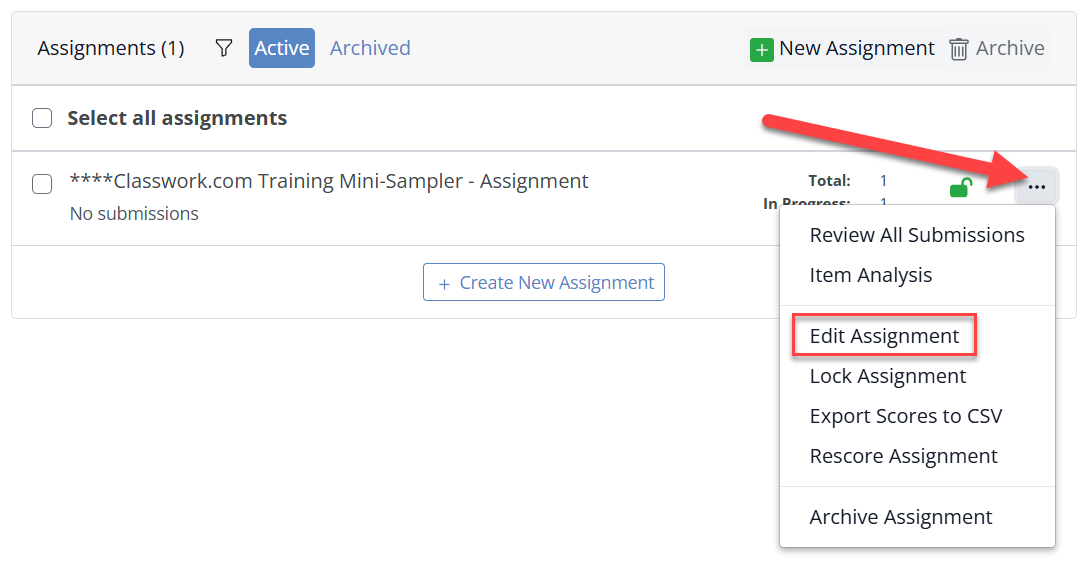
Edit Assignment Settings from the Activities Page
- Open the Activities page.
- Click the activity name to view its assignments.
- Locate the assignment you want to modify.
- Click the three-dot menu to the right of the assignment.
- Select Edit Assignment.
Edit Assignment Settings from the Assignment Detail Page
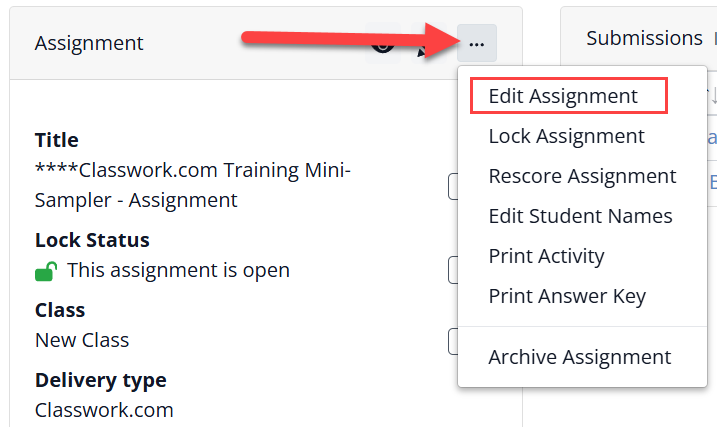
If you already have the assignment open, you can edit the settings directly from the assignment screen.
- Click the three-dot menu at the top of the assignment panel.
- Select Edit Assignment.
After saving your changes, the updated settings will apply to the assignment immediately.
Are you new to Classwork.com? Welcome!
Click here to start your 30 day risk-free PRO trial today.
Was this article helpful?
That’s Great!
Thank you for your feedback
Sorry! We couldn't be helpful
Thank you for your feedback
Feedback sent
We appreciate your effort and will try to fix the article