|
|
How to Add Texas OER Math Materials to Your Account |
Add Bluebonnet™ Learning Math to Your Account
If your school or district subscribes to Classwork and you want to add the Texas OER Math materials, Bluebonnet™ Learning Math, to your account, follow these steps.
Add a Grade Level
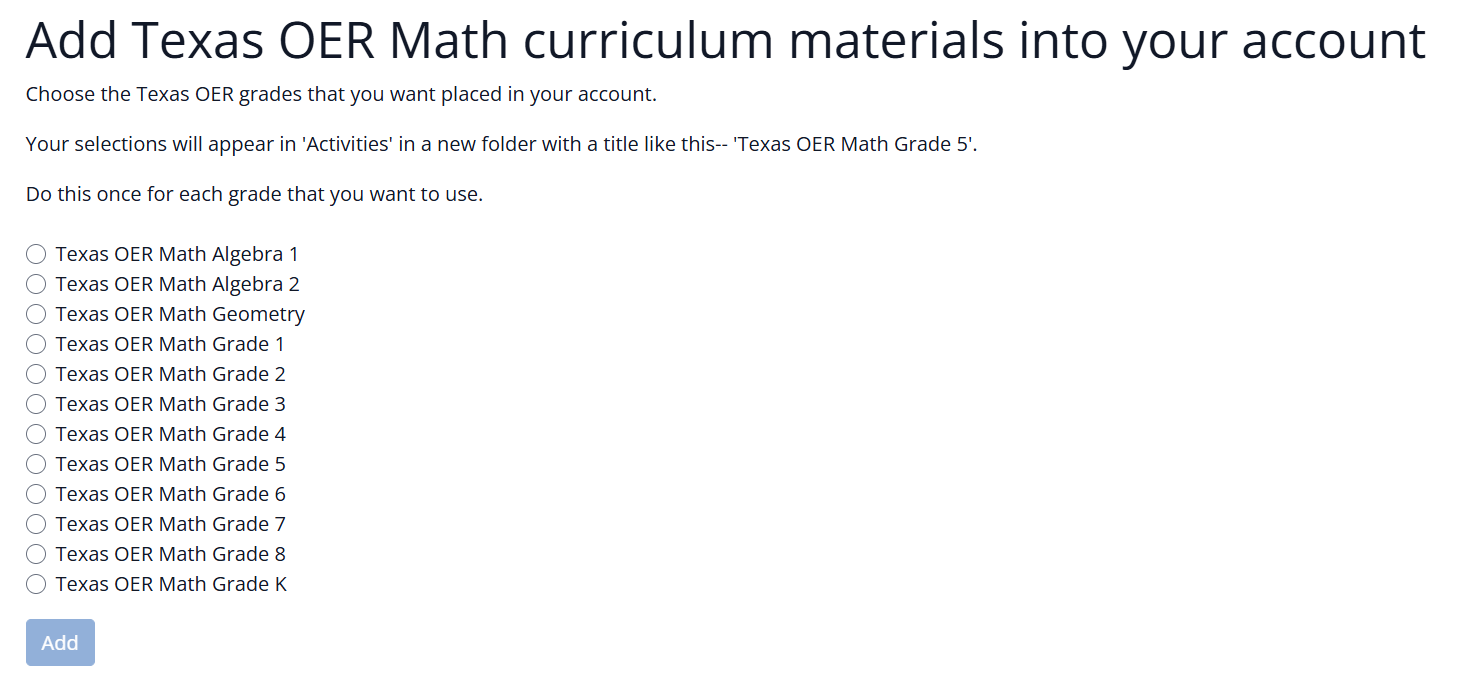
- Click the Add Texas OER Curriculum button at the top of the screen.

- Select the grade level you want to add to your account.
- Click Add.
- You can add only one grade level at a time.
- Each time you add a grade level, Classwork creates a copy of those materials in your account.
Find the New Materials
After the curriculum is added, new folders will appear in your Activities view.

You can repeat this process to add additional grade levels one at a time.
Are you new to Classwork.com? Welcome!
Click here to start your 30 day risk-free PRO trial today.
Was this article helpful?
That’s Great!
Thank you for your feedback
Sorry! We couldn't be helpful
Thank you for your feedback
Feedback sent
We appreciate your effort and will try to fix the article